How to price like a pro in Mall Rivals
Market value is a suggestion. Demand, queues, and cleanliness decide whether that +25% actually sells.
Pricing is the quiet PvP of Mall Rivals. You are not fighting a static NPC economy. You share one mall, one customer pool, and one set of wholesale carts with up to seven other humans. If they sell the same soccer ball for two dollars less, your shelf becomes furniture. Version 1.0 made that worse on purpose: every product now has demand that moves day to day, and store statistics tell you which SKUs actually pull traffic.
This page assumes you can already stock a shelf. If you cannot, go back to getting started.
The shelf is a physical UI
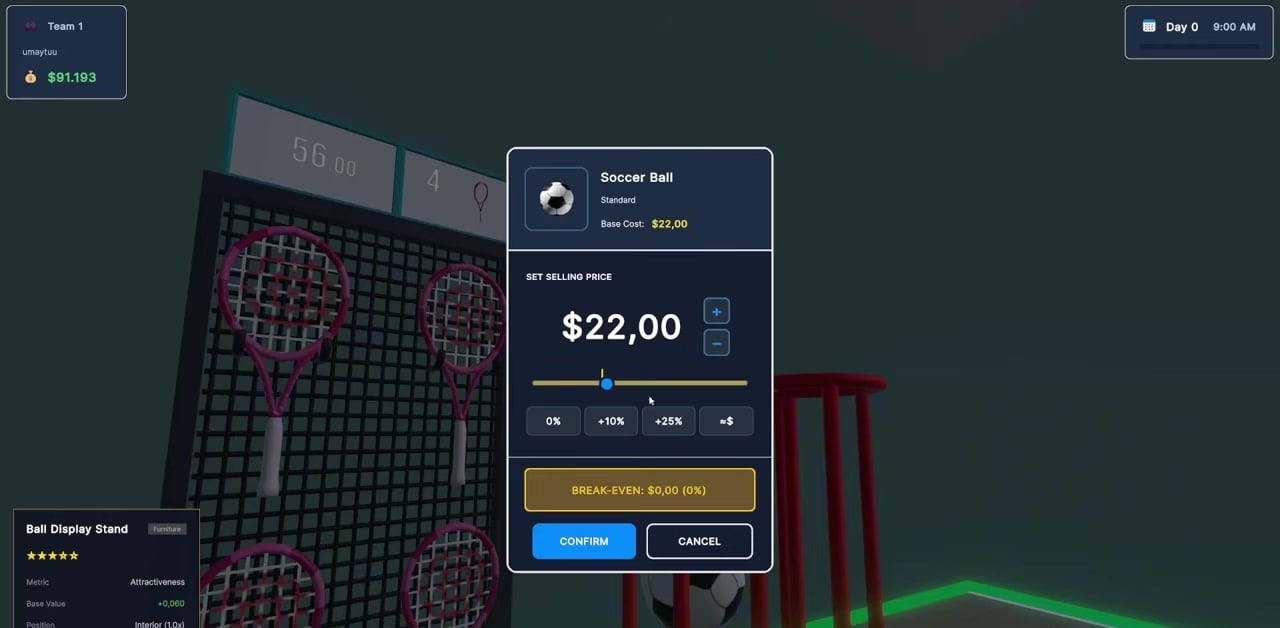
Early players miss the price widget because it is not a pause menu. Look for the marker on the shelf — a small dot that lines up with the dollar sign. Aim, open the selling-price panel, and you will see base cost, a big dollar field, plus/minus, and presets: 0%, +10%, +25%, and a custom equals button. A trailer soccer ball listed base cost $22 with a break-even line at the bottom. Confirm commits. Cancel leaves the old number.
Ike and Me’s rule of thumb still works as a starting heuristic: if cost is 41 and market is 99, selling at 95 undercuts slightly without looking like a fire sale. Stick to round numbers if you like scanning a wall at a glance. The bulk tool can round every price to the nearest dollar in one click — use it after a wholesale dump, not instead of thinking.
Market, cost, and ego
Three numbers matter:
- Base cost — what you paid the vendor or wholesaler.
- Market — what the mall thinks is fair today.
- Your price — what the tag says.
Below market steals flow from the rival with the same license. Far above market is a vanity museum. At market is the lazy default, and it is fine on day one while you learn controls. After that, 1.0 demand will punish set-and-forget. A trending-product event can make a dead SKU hot for an hour. A shortage can make your last three units worth more than the tag you printed this morning. Dynamic events broadcast on banners and ShameTV — the Comeback update added that layer.
What actually brings customers
Price is one lever. The Store Overhaul already tied customer count to attractiveness, cleanliness, and product variety. Empty shelves, filthy floors, and a single SKU wall all reduce visits even if your tag is cheap. That is why a cleaner is not flavor text — see employees. New cash registers also change queue capacity. A cheap till with a long line loses patient customers. A bigger register costs money and space. Measure the queue, not your feelings.
1.0 store statistics break down what is pulling people in. Read them before you restock 400 of a loser. The price helper on this wiki is a planning sheet for margin math, not a cheat against the live demand graph.
How to undercut without dying
Undercutting is the fair-play knife. If two Sports shops share a mall, the lower soccer-ball tag wins the impulse buy. Do not go to cost unless you are dumping inventory before a store sale or you are trying to bankrupt a rival in a cash-target lobby. A 5–10% undercut is usually enough to steal the wanderers. Watch the rival’s tag the next morning; they will answer. Board meetings can also pass policies that change everyone’s numbers — the board meeting page covers votes that are really economic weapons.
If you would rather not play fair, stolen goods on the black market ignore your pretty shelf. That is a crime problem, not a pricing problem, and the police will price that risk for you in fines and jail.
Wholesale, vendors, and stacking
Buy from wholesalers and vendors, haul back, stack. Release-candidate notes even fixed piles so purchased goods stack neatly on the floor instead of exploding into a mess. Corridor limits still apply: too many boxes outside and new orders block. Price after stock is on the sale shelf, not while the crate is in the hall, or you will fine yourself in the middle of a markup.
Events can flash wholesale opportunities. When they do, buy the trending line, not random filler. Variety still matters, but a mall that is screaming about a product is telling you where the day’s demand spike is.
A simple opening policy
- Price new stock at market or 5% under.
- After the first peak, check which SKUs moved. Raise the winners toward +10% if queues stay healthy.
- Discount leftovers before they become clutter that hurts attractiveness.
- Recheck market after every daily demand shift in 1.0.
- Never leave a $0.00 processing screen up — Esc out of the register overlay if a card payment hangs, then fix the tag.
The short “price like a pro” clip in the middle of this article is a 21-second aim lesson. Use it, then come back to the demand rules 1.0 added, because the clip cannot see tomorrow’s graph.
Frequently Asked Questions
Quick answers players actually search for in Mall Rivals.
How do I change prices in Mall Rivals?
Aim at the shelf dollar marker, open the selling-price panel, set a number or a +10% / +25% preset, and confirm.
Should I always undercut rivals?
A small undercut steals wanderers. Going to cost only makes sense as a dump or a revenge war. Watch store stats and demand first.
Why did my sales drop overnight?
1.0 demand shifts daily. Events, cleanliness, empty shelves, and a rival’s new tag all move traffic. Recheck market every morning.
Is there a bulk pricing tool?
Yes. You can round all prices to the nearest dollar in one click. Use it after a big restock, then still review hero SKUs by hand.