Mall Rivals controls and hotkeys
WASD, mouse grab, tablet, and the four keys that decide whether your cashier works or idles.
Mall Rivals is a first-person physical sim with a tablet on top. If the keybinds feel like a shooter, that is because you are carrying boxes, not ADS-ing. Full controller support is on the Steam page, and Steam Deck is listed as playable with caveats: some functions are awkward on the default layout. This page is the keyboard/mouse grammar plus the on-screen keys the game itself prints. Rebind in the menu if your hands disagree.
New to the mall? Pair this with getting started so you are not learning grab and lease at the same time.
Move, look, grab
- WASD — walk. There is no slide-cancel tech. You are a shopkeeper.
- Mouse — look. The crosshair or dot is how you aim at shelves, boxes, people, and dollar signs.
- Left mouse — grab a box, hold it, then click again to place on a shelf or stack. Ike’s tutorial is explicit: grab with left mouse, walk with WASD, place with left mouse.
- Scroll — hotbar. Community reports mention the hotbar scrolling; if a teammate’s register interaction locks your buttons, that is a known multiplayer hitch, not your sensitivity.
Do not sprint-dump crates in the hall. The cop does not care that you “were about to” bring them in. Crime starts with physics, not with a lockpick.
Store UI you will live in
Select Store Type is a panel, not a world object. Categories on the left, details on the right: Store ID, price, sales floor size, storage size. Confirm is grey until you pick a live category. Coming-soon tiles (Jewelry / Toys / Department in the first trailer) will not take your money.
Set Selling Price is the shelf overlay: big dollar field, + / −, 0% / +10% / +25% / custom, break-even line, Confirm / Cancel. Aim at the dollar marker. Details on pricing.
Tablet is the management brain: employee panel, store close/sell, host tools if you are hosting, and later 1.0 stats. Learn where fire and reassign live so you are not hunting a worker across the atrium during a queue.
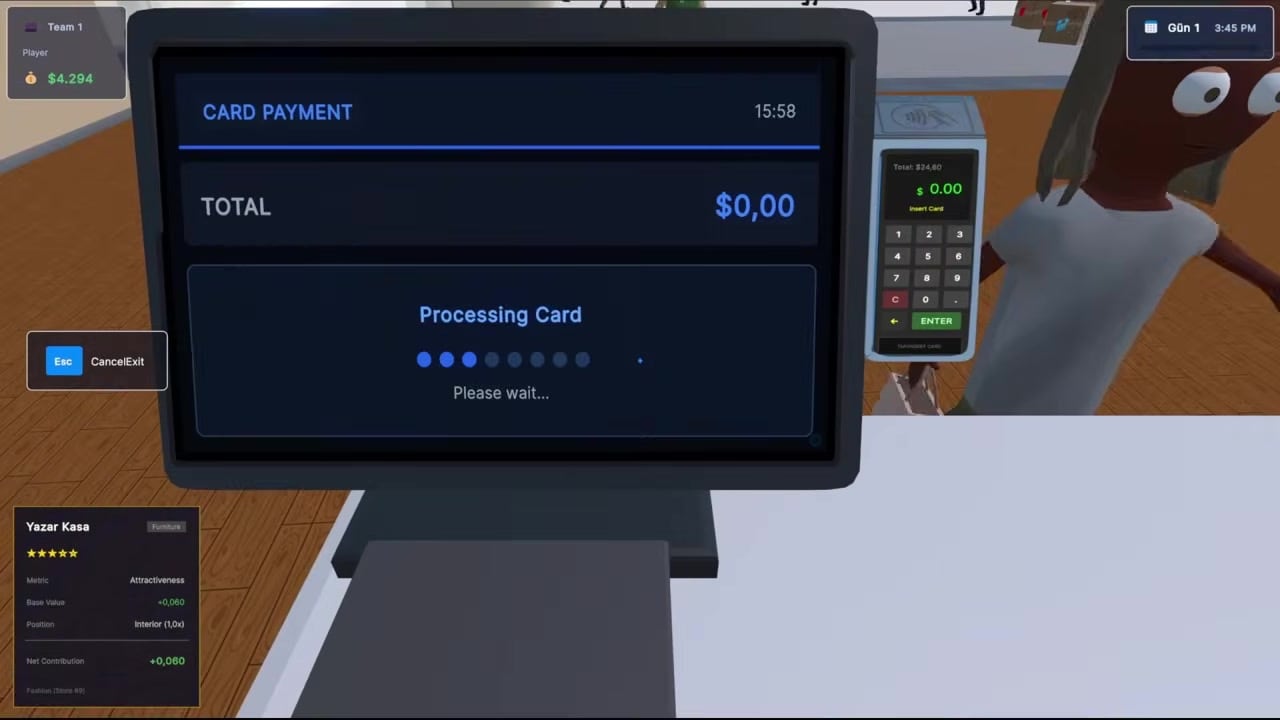
Register / card payment — customers tap, a screen shows TOTAL and Processing Card. Esc is labeled Cancel/Exit on that overlay. If you tab into the PIN pad and panic, Esc is the eject. A hung overlay is how people think the game “ate input” when a teammate is also on a till.
Employee talk keys
When you stand in front of a worker, the prompt is a small menu, not a cutscene:
| Key | Action |
|---|---|
| 1 | Reassign |
| 2 | Unassign |
| 3 | Fire |
| F | Never mind |
Reassign is how a cleaner becomes a cashier on store two. Unassign is the polite “stop standing on my till.” Fire is the wage leak plugged. F backs out without drama. Forgetting this table is why employees “do nothing.”
Busted prompts use the same number keys: 1 pay fine, 2 bribe, 3 can’t pay. Muscle memory transfers. That is either convenient or dangerous.
Controller and Deck
Steam lists full controller support. Expect left stick move, right stick look, face button interact, and a hold-to-grab equivalent. Because so much of the game is 3D aiming at small shelf widgets, mouse is still the kinder first-week device. On Deck, some tablet and precision shelf actions are the “not fully accessible on default” part of the compatibility note. If a widget will not highlight, swap to mouse or raise the look sensitivity one notch, not ten.
Host and lobby keys
Hosting is not a combat role, but you get extra tablet tools: reset/sell stores left by disconnects, unban from Player Management. Those saves the mall when a troll leases three units and leaves. If you are not the host, you cannot fix that wreck — ask. Lobby settings also change match length and win targets; that is covered in game modes, not here.
Settings worth touching
- Look sensitivity until you can line up the shelf dollar without overshooting.
- Language. Steam ships 15 interface languages. This wiki is English, French, German, and Spanish.
- Audio until you can hear cop footsteps versus customer chatter.
- Confirm you are on the main branch, not an old Unstable leftover, unless you intend to test. Branch switching is Properties → Betas on Steam — see updates.
A 60-second drill
- Grab a box, walk ten steps, place it on a sale shelf.
- Open price, tap +10%, confirm, close.
- Open a register overlay, Esc out.
- Talk to a worker, press F.
- Walk a corridor with no crates on the floor.
If those five work, you have the language the rest of the wiki assumes. If they do not, stay in a private mall until they do. Rivals will not pause the queue while you find Esc.
Frequently Asked Questions
Quick answers players actually search for in Mall Rivals.
How do I pick up boxes in Mall Rivals?
Left mouse grabs, WASD walks, left mouse places on a shelf. Do not drop stock in the corridor.
How do I leave the cash register screen?
Esc is Cancel/Exit on the card-payment overlay. Use it if the PIN pad traps the camera.
What keys reassign employees?
1 reassign, 2 unassign, 3 fire, F never mind, while looking at the worker.
Does Mall Rivals support a controller?
Yes, full controller support on Steam. Steam Deck is playable, with some tablet and shelf actions easier on mouse.